Partition Key use cases and examples
Kafka messages are distributed across multiple partitions within a topic based on the partition key. This key determines which partition a particular record will be sent to.
The specific partition where a message lands is determined by the partitioning logic.By default, Kafka Writer uses a hash-based partitioning algorithm. This results in events with partition keys resulting in the same hash being sent to the same partition.
Partition Key
The default configuration for Kafka Writer, when no partition key is specified, all messages are routed to a partition “0”. This ensures that data is written in the same order in which it is received from the source based on the topic mapping.
In case of OLTP CDC sources, control Events BEGIN and COMMIT from source will be added as a Kafka message if all the incoming events are mapped to a single topic and partitioning is empty. This is true, when a source CDC Reader is configured with ‘FilterTransactionBoundaries :false’ value.
You can define custom partition keys by referencing a field name (for typed input streams) or a key from metadata or user data from WAEvent. This allows dynamic distribution of data across partitions based on value from the input stream.
Scenario 1:Input Typed eventwith field ‘deptId’
PartitionKey: Custom,
CustomPartitionKey : deptId
The distribution across the partition is done based on the deptId field.
Scenario 2 : From OLTP CDC sources
PartitionKey : Custom,
CustomPartitionKey : @metadadata(OperationName)
The distribution across partitions is done based on the `operationName`.
Scenario 3 : For File Based Sources
PartitionKey : Custom,
CustomPartitionKey : @metadata(directory)
The distribution across partitions is done based on the metadata field `directory`.
Optionally, the Message Key can also be used as the partition key. In this case the messages with the same message key will end up in the same partition. The partitioning behavior depends on the message key configuration which can be NONE, CUSTOM or PRIMARY KEY. Various usage flavors:
Scenario 1
MessageKey: None,
PartitionKey: None
Result : All the events are sent to a single partition.
Scenario 2
For the OLTP CDC Sources,
MessageKey: Custom,
CustomMessageKey: @metadata(TableName), @metadata(OperationName),
PartitionKey : UseMessageKey
Result : The events are distributed across partitions based on the table Name and operation name.
Scenario 3
For the WAEvent of File Based Sources,
MessageKey: Custom,
CustomMessageKey: @metadata(directory);@metadata(FileName),
PartitionKey : UseMessageKey
Result : The events are distributed across partitions based on the metadata fields directory and fileName.
Scenario 4
For the Sch.EMP schema with Primary Key,
MessageKey: PrimaryKey,
PartitionKey: UseMessageKey
Here Message key values and Partition key values are derived from the primary key, for example, in case of sch.EMP table the events are distributed across partitions based on the primary key “empId”.
Scenario 5
For the Sales Transaction tables (does not containPrimary Key),
MessageKey: PrimaryKey,
PartitionKey: UseMessageKey
Here Message key values and Partition key values are derived from the primary key, for example, in case sales.Transaction is not configured with any PK, distribution will be based on all the columns.
Note
The specified partition key is mandatory to be present in all the incoming events except for the control events and DDL events if Persist Schema was set to OFF. Otherwise the application will HALT.
Partitioning Logic
The partitioning logic ensures that events with the same partitioning key consistently land in the same Kafka partition. Striim supports the following partitioning strategies:
Default - Hash Based Partitioning
When Kafka Writer receives an event, the adapter computes a hash value from the provided partition key(s) and performs a modulo operation with the total number of partitions in the topic. The result determines which partition the message is assigned to.
Partition = hash(partition_key) % number_of_partitions
This approach guarantees that the same partition key always maps to the same partition, ensuring ordered processing for related events. Examples:
Let us take an example of a single topic <->single table mapping with primary key as partition key.
Scenario: Employee Table with Primary Key Partitioning
Configuration:
Topic: EmployeeTopic
MessageKey: PrimaryKey PartitionKey : MessageKey
Note: EmployeeTopic has 3 partitions
Table Schema: SCH.EMP (Primary key = Emp_Id)
Since DML 1 and DML 3 have the same Emp_Id (101), both the events will be mapped to Partition 0. Similarly, DML 2 and DML 4 have Emp_Id (201), so both the events will be mapped to Partition 2. This guarantees that all events for the same employee are processed in the correct order.
Hash Collisions
In some cases, two different partition keys may produce the same hash value. When this happens, both keys are assigned to the same partition.
Note :
If the number of partitions in a topic is increased, the partition assignment for existing keys will change. This is because the modulo operation now uses a different divisor, which can result in messages being routed to different partitions than before. To avoid data inconsistencies or ordering issues, always quiesce the application before altering the number of Kafka partitions.
Custom Partitioning
The Kafka Writer adapter supports custom partitioners to control how records are distributed across partitions in the target topic. A custom partitioner can be configured using the Partitioner.class property in Producer Configurations within the Kafka connection profile.
By default, Striim uses a built-in hash-based partitioner when no custom partitioner is specified.
To configure a custom partitioner, provide the fully qualified class name in the Partitioner.class property.
For step-by-step instructions on creating a custom partitioner, refer to the Custom Partitioner Guide.
Note :
One partitioning strategy per target – The Kafka Writer applies the same partitioning logic to all topics within a single target. For topics that require different partitioning strategies, set up separate Kafka targets
Consistent partition assignment for E1P – The partitioner must always return the same partition ID for a given partition key, even during retries. Inconsistent partition assignments can disrupt recovery, as it depends on the exact topic and partition where data was originally written.
Example:
Scenario: Employee Table with Primary Key Partitioning
Note: EmployeeTopic has 3 partitions
Table Schema: Sch.EMP (Primary key = Emp_Id)
Custom Partitioner:
package com.example.kafka;

import com.striim.custom.partitioner.PartitionerIntf;
import org.apache.kafka.common.Cluster;

import java.util.List;
import java.util.Map;

public class RangePartitioner implements PartitionerIntf {

    private int rangeSize = 100; // default range size (0-99 → partition 0, 100–199 → partition 1, etc.)

    @Override
    public int partition(
            String topic,
            Object key,
            byte[] keyBytes,
            Object value,
            byte[] valueBytes,
            Cluster cluster) {

        List<?> partitions = cluster.partitionsForTopic(topic);
        int numPartitions = partitions.size();

        if (key == null) {
            // fallback to 0 if no key provided
            return 0;
        }

        int keyInt;
        try {
            keyInt = Integer.parseInt(key.toString());
        } catch (NumberFormatException e) {
            // fallback to partition 0 if key is not numeric
            return 0;
        }

        int partition = keyInt / rangeSize;

        return partition % numPartitions;
    }

    @Override
    public void close() {
    }
}
Configuration:
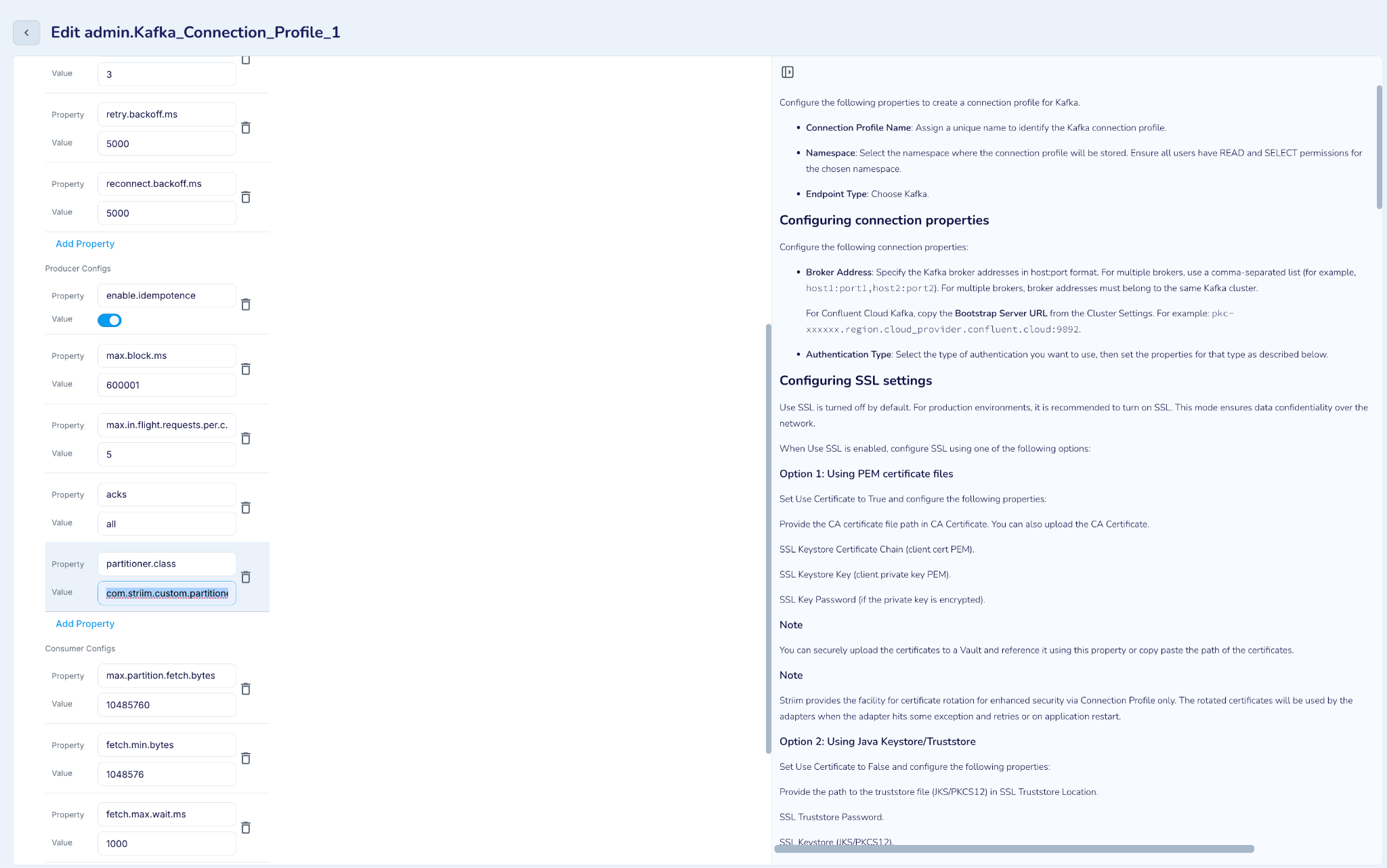 |
Since DML 1 and DML 3 have the same Emp_Id (101), both the events will be mapped to Partition 1. Similarly, DML 2 and DML 4 have Emp_Id (201), so both the events will be mapped to Partition 2. This guarantees that all events for the same employee are processed in the correct order.
Topic + partition key examples
The tables below show how Kafka Writer distributes events with various topic and partition key combinations.
Single Topic with one partition
Use case : All source data to one target topic, partition 0.
When you want to move the data from a source which is unpartitioned and wants to preserve the order of source DML operations, this is the preferred setting.
Property Configuration:
Topics : <topic name>
PartitionKey : NONE
Behaviour: Data will always be written to the “0” th partition of the specified topic. Since there is only one partition even specifying a PartitionKey doesn’t help here.
Source type | Property configuration | DML and topic-partition distribution |
|---|---|---|
OLTP/DWH Source (WAEvent) | Topics: "EmployeeTopic" PartitionKey: NONE | Employee INSERT: Result: → EmployeeTopic, Partition 0 Employee UPDATE: Result: → EmployeeTopic, Partition 0 Department INSERT: Result: → EmployeeTopic, Partition 0 |
File-Based Source (WAEvent) Note: JsonNodeEvent and AvroEvent will have similar behaviour | Topics: "SalesTopic" PartitionKey: NONE | October sales INSERT: Result: → SalesTopic, Partition 0 November sales INSERT: Result: → SalesTopic, Partition 0 October sales UPDATE: Result: → SalesTopic, Partition 0 |
Kafka Source (WAEvent) Note: JsonNodeEvent and AvroEvent will have similar behaviour | Topics: "EmpTopic" PartitionKey: NONE | Employee INSERT: Result: → EmpTopic, Partition 0 Department UPDATE: Result: → EmpTopic, Partition 0 |
NoSQL Source (JSONNodeEvent) | Topics: "EmpTopic" PartitionKey: NONE | Employee INSERT: Result: → EmpTopic, Partition 0 Department INSERT: Result: → EmpTopic, Partition 0 |
AvroEvent | Topics: "EmployeeTopic" PartitionKey: NONE | Employee INSERT: Result: → EmployeeTopic, Partition 0 Department INSERT: Result: → EmployeeTopic, Partition 0 |
Single Topic with multiple partitions
Use case: All source data to one target topic with multiple partitions.If the events from the source are of the same category but might belong to a different sub category this setting can be used. ll source data to one target topic with multiple partitions.If the events from the source are of the same category but might belong to a different sub category this setting can be used.
Note: If the data is from an unpartitioned source, the order of data will vary since it will be distributed to multiple partitions. The order of data is preserved only within a single partition.
Properties:
Topics : <topic name>
PartitionKey : UseMessageKey
or
Topics : <topic name>
PartitionKey : Custom
CustomPartitionKey : <field name>
Behavior: Data will be distributed to different partitions in a topic, based on the value of the field specified in PartitionKey.
Source type | Property configuration | DML and topic-partition distribution |
|---|---|---|
OLTP/DWH Source (WAEvent) | Topics: "EmpTopic" PartitionKey:Custom CustomPartitionKey:"@metadata(TableName)" Note: No. of Partitions: 3 | Employee INSERT (TableName=Sch.EMP): Hash Calculation: "Sch.EMP".hashCode() → 1239456 Partition = abs(1239456) % 3 = 0 Result: → EmpTopic, Partition 0 Department INSERT (TableName=Sch.DEPT): Hash Calculation: "Sch.DEPT".hashCode() → 2156789 Partition = abs(2156789) % 3 = 1 Result: → EmpTopic, Partition 1 |
File-Based Sources (WAEvent) Note: JsonNodeEvent and AvroEvent will have similar behaviour | Topics: "SalesTransactionTopic" PartitionKey:Custom CustomPartitionKey:"@metadata(FileName)" Note: No. of Partitions: 3 | California Sale (FileName=october_sales_2018.csv): Hash: "october_sales_2018.csv".hashCode() = 1432092303 Partition: abs(1432092303) % 3 = 0 Result: → SalesTransactionTopic, Partition 0 India Sale: (FileName=october_sales_2018.csv): Hash: "october_sales_2018.csv".hashCode() = 1432092303 Partition: abs(1432092303) % 3 = 0 Result: → SalesTransactionTopic, Partition 0 New York Sale: (FileName=november_sales_2019.csv): Hash: "november_sales_2019.csv".hashCode() = -129772162 Partition: abs(-129772162) % 3 = 1 Result: → SalesTransactionTopic, Partition 1 California Sale: (FileName=october_sales_2018.csv): Hash: "october_sales_2018.csv".hashCode() = 1432092303 Partition: abs(1432092303) % 3 = 0 Result: → SalesTransactionTopic, Partition 0 |
Kafka Source (WAEvent) Note: JsonNodeEvent and AvroEvent will have similar behaviour | Topics: "DataTopic" PartitionKey:Custom CustomPartitionKey:"@metadata(PartitionID)" Note: No. of Partitions: 3 | Employee INSERT (PartitionID=0) Hash: "0".hashCode() = 48 Partition: abs(48) % 3 = 0 Result: → DataTopic, Partition 0 Department UPDATE (PartitionID=1) Hash: "1".hashCode() = 49 Partition: abs(49) % 3 = 1 Result: → DataTopic, Partition 1 |
NoSQL Source (JSONNodeEvent) | Topics: "EmployeeTopic" PartitionKey:Custom CustomPartitionKey:"@metadata(CollectionName)" Note: No. of Partitions: 3 | Employee INSERT (TableName=EMP): Hash: "EMP".hashCode() = 69390 Partition: abs(69390) % 3 = 0 Result: → EmployeeTopic, Partition 0 Department INSERT (TableName=DEPT): Hash: "DEPT".hashCode() = 2030836 Partition: abs(2030836) % 3 = 1 Result: → EmployeeTopic, Partition 1 |
Typed Event | Topics: "EmpTopic" PartitionKey:Custom CustomPartitionKey: "deptId" Note: No. of Partitions: 3 deptId is a field in Employee Type | Employee INSERT (deptId=10): Hash Calculation: "10".hashCode() → 1567 Partition = abs(1567) % 3 = 1 Result: → EmpTopic, Partition 1 Employee INSERT (deptId=10: Hash Calculation: "10".hashCode() → 1567 Partition = abs(1567) % 3 = 1 Result: → EmpTopic, Partition 1 Employee INSERT (deptId=15): Hash Calculation: "15".hashCode() → 1572 Partition = abs(1572) % 3 = 0 Result: → EmpTopic, Partition 0 |
Multiple topics with single partition
Use case :
Wildcard mapping or explicit mapping of one or multiple source entities to one or multiple target topics.
When you want to map a source directory to a target topic in case of file based source.
When you want to replicate specific tables data from an OLTP source to a specific topic. It could be initial load or CDC. The order of changes happening in a source table will be maintained if the topic has only one partition.
When you want to replicate specific topics data from the Kafka source to a specific topic.
Behaviour: Data will be written to the zeroth partition of different topics.
Properties:
Explicit mapping:
Topics: <Value of TopicKey>,<Topic Name>; <Value of TopicKey1>,<Topic Name1>,...
Wildcard mapping:
Topics:  <value of topic key>, %;<value of topic key>, %
TopicKey: <name of a field in userdata or metadata of input stream>
AutoCreatetopic: True / False → When set to true creates the target topic
Partitioning : NONE
TopicKey property is mandatory in this case. TopicKey gives the field based on which data will be mapped to different topics.
Accepted values of TopicKey:
Field name in case of typed input stream
@metadata(<Meta field name>) or @userdata(<user data field name) in case of WAEvent/JSONNodeEvent/AvroEvent
Topics - One or more source entities (could be a table or file or source topic) to target topics can be mapped directly. Wildcard mapping is also supported. Based on the Topickey each incoming event will be mapped to the target topic.
In both the cases the topic will be auto created if the target topic does not exist, if “AutoCreate” configuration was set to true. Otherwise you will have to pre-create the topics before starting the Striim application.
Note : Specifying a PartitionKey doesn’t affect the data distribution if the target topic has only one partition. But if there is a mix of target topics with single or multiple partitions you can choose the writer setting as per scenarios 4.
Source type | Property configuration | DML and topic-partition distribution |
|---|---|---|
OLTP/DWH Source (WAEvent) | Topics: "Sch.EMP,EmpTopic; Sch.DEPT,DeptTopic" TopicKey: "@metadata(TableName)" PartitionKey: None | Employee INSERT (TableName=Sch.EMP): Topic Mapping: Sch.EMP → EmpTopic Result: → EmpTopic, Partition 0 Employee INSERT (TableName=Sch.EMP): Topic Mapping: Sch.EMP → EmpTopic Result: → EmpTopic, Partition 0 Department UPDATE (TableName=Sch.DEPT): Topic Mapping: Sch.DEPT → DeptTopic Result: → DeptTopic, Partition 0 Employee DELETE (TableName=Sch.EMP): Topic Mapping: Sch.EMP → EmpTopic Result: → EmpTopic, Partition 0 |
Topics: "Sch.%,%;Sales.%,%" TopicKey: "@metadata(TableName)" PartitionKey: None AutoCreateTopic: true | Employee INSERT (TableName=Sch.EMP): Topic Mapping: Sch.EMP → Sch.EMP Topic Creation: "Sch.EMP" (auto-created) Result: → Sch.EMP, Partition 0 Employee INSERT (TableName=Sch.EMP): Topic Mapping: Sch.EMP → Sch.EMP Result: → Sch.EMP, Partition 0 Department UPDATE (TableName=Sch.DEPT): Topic Mapping: Sch.DEPT → Sch.DEPT Topic Creation: "Sch.DEPT" (auto-created) Result: → Sch.DEPT, Partition 0 Employee DELETE (TableName=Sch.EMP): Topic Mapping: Sch.EMP → Sch.EMP Result: → Sch.EMP, Partition 0 | |
File-Based Source (WAEvent) Note: JsonNodeEvent and AvroEvent will have similar behaviour | Topics: "october_sales_2018.csv,OctoberSalesTopic; november_sales_2019.csv,NovemberSalesTopic" TopicKey: "@metadata(FileName)" PartitionKey: None | October Sales INSERT (FileName=october_sales_2018.csv): Topic Mapping: october_sales_2018.csv → OctoberSalesTopic Result: → OctoberSalesTopic, Partition 0 October Sales INSERT (FileName=october_sales_2018.csv): Topic Mapping: october_sales_2018.csv → OctoberSalesTopic Result: → OctoberSalesTopic, Partition 0 November Sales - INSERT (FileName=november_sales_2019.csv): Topic Mapping: november_sales_2019.csv → NovemberSalesTopic Result: → NovemberSalesTopic, Partition 0 October Sales UPDATE (FileName=october_sales_2018.csv): Topic Mapping: october_sales_2018.csv → OctoberSalesTopic Result: → OctoberSalesTopic, Partition 0 |
Topics: "%,%" TopicKey: "@metadata(FileName)" PartitionKey: None AutoCreateTopic: true | October Sales INSERT (FileName=october_sales_2018.csv): Topic Mapping: october_sales_2018.csv → october_sales_2018.csv Result: → october_sales_2018.csv, Partition 0 November Sales - INSERT (FileName=november_sales_2019.csv): Topic Mapping: november_sales_2019.csv → november_sales_2019.csv Result: → november_sales_2019.csv, Partition 0 | |
Kafka Source (WAEvent) Note: JsonNodeEvent and AvroEvent will have similar behaviour | Topics: "hr-employees,EmpTopic;hr-department,DeptTopic" TopicKey: "@metadata(TopicName)" PartitionKey: None | Employee INSERT (TopicName=hr-employees): Topic Mapping: hr-employees → EmpTopic Result: → EmpTopic, Partition 0 Employee UPDATE (TopicName=hr-employees): Topic Mapping: hr-employees → EmpTopic Result: → EmpTopic, Partition 0 Department UPDATE (TopicName=hr-department): Topic Mapping: hr-department → DeptTopic Result: → DeptTopic, Partition 0 |
MessageBus Source Topics: "%,%" TopicKey: "@metadata(TopicName)" PartitionKey: None AutoCreateTopic: true | Employee INSERT (TopicName=hr-employees): Topic Mapping: hr-employees → hr-employees Topic Creation: "hr-employees" (auto-created) Result: → hr-employees, Partition 0 Employee UPDATE (TopicName=hr-employees): Topic Mapping: hr-employees → hr-employees Result: → hr-employees, Partition 0 Department UPDATE (TopicName=hr-department): Topic Mapping: hr-department → hr-department Topic Creation: "hr-department" (auto-created) Result: → hr-department, Partition 0 | |
NoSQL Source (JSONNodeEvent) | Topics: "Sch.EMP,EmpTopic;Sch.DEPT, DeptTopic;Sales.Transaction,SalesTopic" TopicKey: "@metadata(NameSpace)" PartitionKey: None | Employee INSERT (NameSpace=Sch.EMP): Topic Mapping: Sch.EMP → EmpTopic Result: → EmpTopic, Partition 0 Employee UPDATE (NameSpace=Sch.EMP): Topic Mapping: Sch.EMP → EmpTopic Result: → EmpTopic, Partition 0 Department INSERT (NameSpace=Sch.DEPT): Topic Mapping: Sch.DEPT → DeptTopic Result: → DeptTopic, Partition 0 October Sales UPDATE (NameSpace=Sales.Transaction): Topic Mapping: Sales.Transaction → SalesTopic Result: → SalesTopic, Partition 0 |
Topics: "%.%" TopicKey: "@metadata(NameSpace)" PartitionKey: None AutoCreateTopic: true | Employee INSERT (NameSpace=Sch.EMP): Topic Mapping: Sch.EMP → Sch.EMP Topic Creation: "Sch.EMP" (auto-created) Result: → Sch.EMP, Partition 0 Employee UPDATE (NameSpace=Sch.EMP): Topic Mapping: Sch.EMP → Sch.EMP Result: → Sch.EMP, Partition 0 Department UPDATE (NameSpace=Sch.DEPT): Topic Mapping: Sch.DEPT → Sch.DEPT Topic Creation: "Sch.DEPT" (auto-created) Result: → Sch.DEPT, Partition 0 October Sales INSERT (NameSpace=Sales.Transaction): Topic Mapping: Sales.Transaction → Sales.Transaction Topic Creation: "Sales.Transaction" (auto-created) Result: → Sales.Transaction, Partition 0 | |
Typed Events | Topics: "\"United States\",USTopic;India,IndiaTopic" TopicKey: Country PartitionKey: None | Sales Transaction #1 (Country = United States): Topic Mapping: "United States" → USTopic Result: → USTopic, Partition 0 Sales Transaction #2 (Country = United States): Topic Mapping: "United States" → USTopic Result: → USTopic, Partition 0 Sales Transaction #3 (Country = India): Topic Mapping: "India" → IndiaTopic Result: → IndiaTopic, Partition 0 |
Topics: "%,%" TopicKey: Country PartitionKey: None | Sales Transaction #1 (Country = United States): Topic Mapping: "United States" → United States Sales Transaction #2 (Country = United States): Topic Mapping: "United States" → United States Note: spaces are not allowed in Kafka Topic names, so the application will HALT. Use Explicit Topic name. Sales Transaction #3 (Country = India): Topic Mapping: "India" → India Topic Creation: "India" (auto-created) Result: → IndiaTopic, Partition 0 |
Multiple topics with multiple partitions
Use case :
It is the extension of the previous scenario. After distributing source data to multiple topics, they can be partitioned based on a subcategory.
This setting is mostly done when the downstream application is running some analysis based on the categories of data.
In the case of OLTP sources, when you want to map a source table to a topic and distribute the data further based on operation name or primary across multiple partitions this scenario will be useful. It could be initial load or CDC. The order of changes happening in a source table will be maintained only at the partition level.
Eg: If the data is distributed based on the primary key, changes happening on the same key will always land into the same partition and will be ordered.
Property Configuration:
Explicit mapping:
Topics : <Value of TopicKey>,<Topic Name>;...
Wildcard mapping:
Topics : <value of topic key>, %;<value of topic key>, %
TopicKey : <name of a field in Userdata or Metadata>
AutoCreatetopic: True / False
PartitionKey : UseMessageKey
or
PartitionKey: Custom
Custom Partition Key : <field name>
Behaviour: Data will be written to multiple topics and within a topic data will be distributed based on the PartitionKey. TopicKey property is mandatory in this case. TopicKey gives the field based on which data will be mapped to different topics.
Accepted values of TopicKey:
Field name in case of typed input stream
@metadata(<Meta field name>) or @userdata(<user data field name) in case of WAEvent/JSONNodeEvent/AvroEvent
If PartitionKey is specified data will be distributed among the partitions.
Note: If the target topic has only one partition, the events will be written to partition 0 immaterial of the partition key configuration
Source type | Property configuration | DML and topic-partition distribution |
|---|---|---|
OLTP/DWH Source (WAEvent) | Topics: "Sch.EMP,EmpTopic;Sch.DEPT,DeptTopic" TopicKey: "@metadata(TableName)" MessageKey: PrimaryKey PartitionKey: UseMessageKey Note: No. of Partitions: 3 | Employee INSERT (TableName=Sch.EMP, Emp_Id="101"): Topic Mapping: "Sch.EMP" → EmpTopic Message Key: "101" Hash: "101".hashCode() = 48626 Partition: abs(48626) % 3 = 2 Result: → EmpTopic, Partition 2 Employee INSERT (TableName=Sch.EMP, Emp_Id="201"): Topic Mapping: "Sch.EMP" → EmpTopic Message Key: "201" Hash: "201".hashCode() = 49587 Partition: abs(49587) % 3 = 0 Result: → EmpTopic, Partition 0 Department INSERT (TableName=Sch.DEPT, Dept_Id="10"): Topic Mapping: "Sch.DEPT" → DeptTopic Message Key: "10" Hash: "10".hashCode() = 1567 Partition: abs(1567) % 3 = 1 Result: → DeptTopic, Partition 1 Department INSERT (TableName=Sch.DEPT, Dept_Id="10"): Topic Mapping: "Sch.DEPT" → DeptTopic Hash: "20".hashCode() = 1598 Partition: abs(1598) % 3 = 2 Result: → DeptTopic, Partition 2 |
Topics: "Sch.%,%" TopicKey: "@metadata(TableName)" PartitionKey:Custom CustomPartitionKey:"@metadata(OperationName)" AutoCreateTopic: true Note: No. of Partitions: 3 | Employee INSERT (TableName=Sch.EMP): Topic Creation: "Sch.EMP" (auto-created) Hash: "INSERT".hashCode() = -1183874794 Partition: abs(-1183874794) % 3 = 1 Result: → Sch_EMP, Partition 1 Employee UPDATE (TableName=Sch.EMP): Topic Creation: "Sch.EMP" Hash: "UPDATE".hashCode() = -1838656823 Partition: abs(-1838656823) % 3 = 2 Result: → Sch_EMP, Partition 2 Department INSERT (TableName=Sch.DEPT): Topic Creation: "Sch.DEPT" (auto-created) Hash: "INSERT".hashCode() = -1183874794 Partition: abs(-1183874794) % 3 = 1 Result: → Sch_DEPT, Partition 1 Department INSERT (TableName=Sch.EMP): Topic Creation: "Sch.EMP" Hash: "DELETE".hashCode() = -1335458389 Partition: abs(-1335458389) % 3 = 0 Result: → Sch_EMP, Partition 0 | |
File-Based Source (WAEvent) Note: JsonNodeEvent and AvroEvent will have similar behaviour | Topics: " october_sales_2018.csv,OctoberSalesTopic; november_sales_2019.csv,NovemberSalesTopic" TopicKey: "@metadata(FileName)" PartitionKey:Custom CustomPartitionKey: "Country" Note: No. of Partitions: 3 | October California Sale: Topic: october_sales_2018.csv → OctoberSalesTopic Hash: "California".hashCode() = -1239456789 Partition: abs(-1239456789) % 3 = 0 Result: → OctoberSalesTopic, Partition 0 October India Sale: Topic: october_sales_2018.csv → OctoberSalesTopic Hash: "India".hashCode() = 70778395 Partition: abs(70778395) % 3 = 1 Result: → OctoberSalesTopic, Partition 1 November New York Sale: Topic: november_sales_2019.csv → NovemberSalesTopic Hash: "New York".hashCode() = 2156789012 Partition: abs(2156789012) % 3 = 1 Result: → NovemberSalesTopic, Partition 1 |
Topics: " october_sales_2018.csv,%;november_sales_2019.csv,%" TopicKey: "@metadata(FileName)" PartitionKey:Custom CustomPartitionKey: "@userdata(year)" AutoCreateTopic: false Note: No. of Partitions: 3 | October Sales INSERT (FileName=october_sales_2018.csv): Topic Creation: "october_sales_2018.csv" (pre-created) Hash: "2018".hashCode() = 1847512394 Partition: abs(1847512394) % 3 = 2 Result: → october_sales_2018.csv, Partition 2 October Sales INSERT (FileName=october_sales_2018.csv): Topic Creation: "october_sales_2018.csv" (pre-created Hash: "2018".hashCode() = 1847512394 Partition: abs(1847512394) % 3 = 2 Result: → october_sales_2018.csv, Partition 2 November Sales INSERT (FileName=november_sales_2019.csv): Topic Creation: "november_sales_2019.csv" (pre-created) Hash: "2019".hashCode() = 1847512394 Partition: abs(1847512394) % 3 = 2 Result: → november_sales_2019.csv, Partition 2 | |
Kafka Source (WAEvent) Note: JsonNodeEvent and AvroEvent will have similar behaviour | Topics: "hr-employees,EmpTopic;hr-departments,DeptTopic" TopicKey: "@metadata(TopicName)" PartitionKey:Custom CustomPartitionKey:"@metadata(KafkaRecordKey)" Note: No. of Partitions: 3 | Employee INSERT (TopicName=hr-employees, KafkaRecordKey=EMP-1001): Topic: "hr-employees" → EmpTopic Hash: "EMP-1001".hashCode() = 1234567890 Partition: abs(1234567890) % 3 = 1 Result: → EmpTopic, Partition 1 Employee UPDATE (TopicName=hr-employees, KafkaRecordKey=EMP-1001): Topic: "hr-employees" → EmpTopic Hash: "EMP-1001".hashCode() = 1234567890 Partition: abs(1234567890) % 3 = 1 Result: → EmpTopic, Partition 1 Department INSERT (TopicName=hr-departments, KafkaRecordKey=DEPT-10): Topic: "hr-departments" → DeptTopic Hash: "DEPT-10".hashCode() = 987654321 Partition: abs(987654321) % 3 = 0 Result: → DeptTopic, Partition 0 Department UPDATE (TopicName=hr-departments, KafkaRecordKey=DEPT-10): Topic: "hr-departments" → DeptTopic Hash: "DEPT-10".hashCode() = 987654321 Partition: abs(987654321) % 3 = 0 Result: → DeptTopic, Partition 0 |
Topics: "%.%" TopicKey: "@metadata(TopicName)" PartitionKey:Custom CustomPartitionKey:"@metadata(PartitionID)" AutoCreateTopic: true Note: No. of Partitions: 3 | Employee INSERT (TopicName=hr-employees, PartitionID=0): Topic Mapping: hr-employees → hr-employees Topic Creation: "hr-employees" (auto-created) Hash: "0".hashCode() = 48 Partition: abs(48) % 3 = 0 Result: → hr-employees, Partition 0 Employee UPDATE (TopicName=hr-employees, PartitionID=0): Topic Mapping: hr-employees → hr-employees Hash: "0".hashCode() = 48 Partition: abs(48) % 3 = 0 Result: → hr-employees, Partition 0 Department INSERT (TopicName=hr-departments, PartitionID=1: Topic Mapping: hr-departments → hr-departments Topic Creation: "hr-departments" (auto-created) Hash: "1".hashCode() = 49 Partition: abs(49) % 3 = 1 Result: → hr-departments, Partition 1 Department UPDATE (TopicName=hr-departments, PartitionID=1): Topic Mapping: hr-departments → hr-departments Hash: "1".hashCode() = 49 Partition: abs(49) % 3 = 1 Result: → hr-departments, Partition 1 | |
Topics: "hr-employees-0,EmployeeTopic" TopicKey: "@metadata(TopicName)" PartitionKey:Custom CustomPartitionKey: "Emp_Id;Dept_Id" Note: No. of Partitions: 3 | Employee INSERT 1 (EmpId=1001, DeptId=10): Topic: hr-employees-0 → EmployeeTopic Partition Key: ["1001", "10"] Hash: ["1001", "10"].hashCode() = 7890123 Partition: abs(7890123) % 5 = 3 Result: → EmployeeTopic, Partition 3 Employee INSERT 3 (EmpId=1001, DeptId=15): Topic: hr-employees-0 → EmployeeTopic Partition Key: ["1001", "15"] Hash: ["1001", "15"].hashCode() = 9012345 Partition: abs(9012345) % 5 = 0 Result: → EmployeeTopic, Partition 0 | |
NoSQL Source (JSONNodeEvent) | Topics: "EMP,EmpTopic;DEPT,DeptTopic;Transaction,TransactionTopic" TopicKey: "@metadata(CollectionName)" PartitionKey:Custom CustomPartitionKey:"@metatdata(OperationName)" Note: No. of Partitions: 3 | Sch.Emp INSERT (CollectionName=EMP, OperationName=INSERT): Topic: "EMP" → EmpTopic Hash: "INSERT".hashCode() = -1183792455 Partition: abs(-1183792455) % 3 = 2 Result: → EmpTopic, Partition 2 Sch.Dept UPDATE (CollectionName=DEPT, OperationName=INSERT): Topic: "DEPT" → DeptTopic Hash: "INSERT".hashCode() = -1183792455 Partition: abs(-1183792455) % 3 = 2 Result: → DeptTopic, Partition 2 Sales.SALES_TRANSACTIONS INSERT (CollectionName=Transaction, OperationName=INSERT): Topic: "Transaction" → TransactionTopic Hash: "INSERT".hashCode() = -1183792455 Partition: abs(-1183792455) % 3 = 2 Result: → TransactionTopic, Partition 2 |
Topics: "Sch,%;Sales,%" TopicKey: "@metadata(DatabaseName)" PartitionKey:Custom CustomPartitionKey:"@metadata(CollectionName)" AutoCreateTopic: true Note: No. of Partitions: 3 | Sch.Emp INSERT (DatabaseName=Sch, CollectionName=EMP): Topic: "Sch" → % (wildcard creates topic: "Sch") Hash: "EMP".hashCode() = 68897 Partition: abs(68897) % 3 = 1 Result: → Sch, Partition 1 Sch.Dept INSERT (DatabaseName=Sch, CollectionName=DEPT): Topic: "Sch" → % (wildcard creates topic: "Sch") Hash: "DEPT".hashCode() = 2063387 Partition: abs(2063387) % 3 = 1 Result: → Sch, Partition 1 Sales.SALES_TRANSACTIONS UPDATE (DatabaseName=Sales, CollectionName=Transaction): Topic: "Sales" → % (wildcard creates topic: "Sales") Hash: "Transaction".hashCode() = 2141246285 Partition: abs(2141246285) % 3 = 2 Result: → Sales, Partition 2 | |
Typed Events | Topics: "California,CaliforniaTopic;NewYork,NewYorkTopic;TamilNadu,TamilNaduTopic" TopicKey: State PartitionKey:Custom CustomPartitionKey: City Note: No. of Partitions: 3 | Sales Transaction #1 (State=California, City=San Francisco): Topic: "California" → CaliforniaTopic Hash: "San Francisco".hashCode() = -1952330277 Partition: abs(-1952330277) % 3 = 2 Result: → CaliforniaTopic, Partition 2 Sales Transaction #2 (State=New York, City=New York): Topic : "New York" → NewYorkTopic Hash: "New York".hashCode() = -1606037088 Partition: abs(-1606037088) % 3 = 1 Result: → NewYorkTopic, Partition 1 Sales Transaction #3 (State=Tamil Nadu, City=Chennai): Topic : "Tamil Nadu" → TamilNaduTopic Hash: "Chennai".hashCode() = -1870135902 Partition: abs(-1870135902) % 3 = 2 Result: → TamilNaduTopic, Partition 2 |
Discarded Events
Events are discarded and not written to Kafka topic in the following scenarios:
Topic Mapping Failure: The event cannot be mapped to any configured Kafka topic based on the Topics and TopicKey configuration.
Missing Topic Key Value: The configured topic key field is present and has a null or empty value in the incoming event. Note: The application will HALT if the topic key field is not present in the incoming event.
The total count of discarded events can be monitored using the "Discarded Event Count" metric.