Read parallelism
When Parallel Threads is set to its default value of 1, Database Reader reads one table at a time. To enable read parallelism, set Parallel Threads to 2 or more, and Database Reader will read tables concurrently. Each thread reads one table at a time. When a thread finishes reading a table, Database Reader assigns the next available table to that thread until it has read all selected tables.
When the Tables property specifies a list of tables, Database Reader selects tables in the order in which they are listed. If the Tables property uses a wildcard, the sequence is determined by the order in which the JDBC driver provides the list of tables.
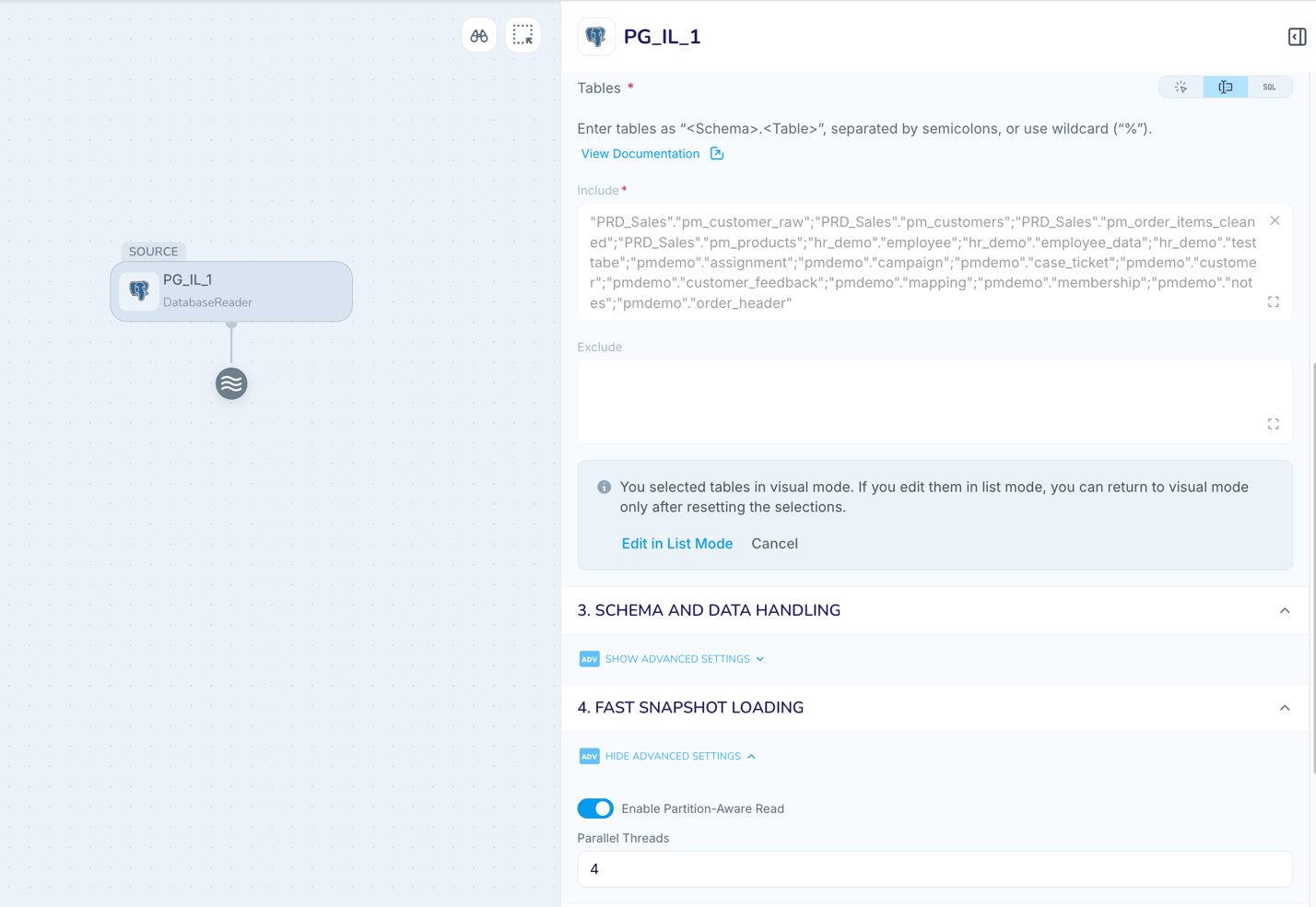
Configure read parallelism in the Flow Designer
In the Database Reader properties, under Fast Snapshot Loading, set the value of Parallel Threads.
Operational considerations
For Fast Snapshot Loading to Azure Synapse, BiqQuery, Databricks, Fabric Data Warehouse, Microsoft Dataverse, or Snowflake, we recommend that you set the number of threads in the Database Reader to be the same as the number of threads in the writer. This value should not be higher than the number of tables to be read. For other targets, set to the default of 1.
For optimum performance, in all cases, we recommend that the number of Parallel Threads does not exceed the same number of cores in your Striim server.
Increasing Parallel Threads in the Database Reader increases concurrent activity against the source. Verify that the source database can sustain the additional load.