MySQL continuous real-time replication using CDC
If not using an automatic pipeline wizard, before creating the continuous real-time replication application, see Switching from initial load to continuous replication of MySQL sources.
MySQL setup for continuous real-time replication
To use MySQL Reader, a MySQL administrator with the necessary privileges must create a user for use by the adapter and assign it the necessary privileges:
CREATE USER 'striim' IDENTIFIED BY '******';
GRANT REPLICATION SLAVE ON *.* TO 'striim'@'%';
GRANT REPLICATION CLIENT ON *.* TO 'striim'@'%';
GRANT SELECT ON *.* TO 'striim'@'%';
The
caching_sha2_passwordandmysql_native_passwordauthentication plugins are supported.The
REPLICATIONprivileges must be granted on*.*. This is a limitation of MySQL.You may use any other valid name in place of
striim. Note that by default MySQL does not allow remote logins by root.Replace
******with a secure password.You may narrow the
SELECTstatement to allow access only to those tables needed by your application. In that case, if other tables are specified in the source properties for the initial load application, Striim will return an error that they do not exist.
On-premise MySQL setup
MySQLReader reads from the MySQL binary log. If your MySQL server is using replication, the binary log is enabled, otherwise it may be disabled.
For on-premise MySQL, the property name for enabling the binary log, whether it is one or off by default, and how and where you change that setting vary depending on the operating system and your MySQL configuration, so for instructions see the binary log documentation for the version of MySQL you are running.
binlog_transaction_compression must be off. For more information, see Binary Log Transaction Compression for the version of MySQL you are running.
If the binary log is not enabled, Striim's attempts to read it will fail with errors such as the following:
Summary of the problem : Invalid binlog related database configuration
Potential root cause : The following global variables does not contain
 required configuration or it cannot be found:
 log_bin,server_id,binlog_format,binlog_row_image.
Suggested Actions: 1.Add --log_bin to the mysqld command line or add
 log_bin to your my.cnf file..
2.Add --server-id=n where n is a positive number to the mysqld command
 lineor add server-id=n to your my.cnf file..
3. Add --binlog-format=ROW to the mysqld command line or add
 binlog-format=ROW to your my.cnf file..
4.Add --binlog_row_image=FULL to the mysqld command line or add
 binlog_row_image=FULL to your my.cnf file..
Component Name: MySQLSource.
Component Type: SOURCE.
Cause: Problem with configuration of MySQL
binlog_format should be ROW.
binlog_row_image should be FULL.
The server_id must be specified.
log_bin is not enabled.
Set binlog_row_image=FULL at the global level. After changing the setting, restart MySQL. Do not set binlog_row_image to something other than FULL at the session level.
To use GTIDs for Start Position in MySQL Reader (see Understanding Start Position and global transaction identifiers (GTIDs)), you must specify the following in every node in the MySQL cluster:
Server_id
binlog_format=ROW
log_bin=ON
binlog_row_image = FULL
gtid_mode=ON
enforce_gtid_consistency=ON
On-premise MariaDB Xpand setup
See Configure MariaDB Xpand as a Replication Master. Set the global variables binlog_format to row and sql_log_bin to true.
Amazon Aurora for MySQL setup
See How do I enable binary logging for my Amazon Aurora MySQL cluster?.
Amazon RDS for MySQL setup
Create a new parameter group for the database (see Creating a DB Parameter Group).
Edit the parameter group, change binlog_format to row and binlog_row_image to full, and save the parameter group (see Modifying Parameters in a DB Parameter Group).
Reboot the database instance (see Rebooting a DB Instance).
In a database client, enter the following command to set the binlog retention period to one week:
call mysql.rds_set_configuration('binlog retention hours', 168);
Azure Database for MySQL setup
You must create a read replica to enable binary logging. See Read replicas in Azure Database for MySQL.
Google Cloud SQL for MySQL setup
You must create a read replica to enable binary logging. See Cloud SQL> Documentation> MySQL> Guides > Create read replicas.
MySQL Reader properties
Before using one of these readers, the tasks described in MySQL setup for continuous real-time replication must be completed.
When this reader is deployed to a Striim server, you must install the appropriate JDBC driver as described in Installing third-party drivers in Striim Platform.
When this reader is deployed to a Forwarding Agent, you must install the appropriate JDBC driver as described in Installing third-party drivers in the Forwarding Agent.
Striim provides wizards for creating applications that read from MySQL and write to various targets. See Creating an application using a wizard for details.
The adapter properties are:
property | type | default value | notes |
|---|---|---|---|
Bidirectional Marker Table | String | When performing bidirectional replication, the fully qualified name of the marker table (see Bidirectional replication). This setting is case-sensitive. | |
CDDL Action | enum | Process | Visible in Flow Designer only when CDDL Capture is enabled. See Handling schema evolution. Do not use Find and Replace DDL unless instructed to by Striim support. |
CDDL Capture | Boolean | False | |
Compression | Boolean | False | Set to True when the output of a MySQL Reader source is the input of a Cassandra Writer target. When Compression is True, MySQL Reader compares the received before and after value for the UPDATE operation and sets the value in the data array in the WAEvent output only when the before and after values are not the same. This may cause problems when the target has an ON UPDATE constraint: the value in the source and target may not match. When replicating data from one MySQL instance to another, when a table contains a column of type FLOAT, updates and deletes may fail with messages in the log including "Could not find appropriate handler for SqlType." Setting Compression to True may resolve this issue. If the table's primary key is of type FLOAT, to resolve the issue you may need to change the primary key column type in MySQL. |
Connection Profile Name | String | Appears in Flow Designer only when Use Connection Profile is True. See Connection profiles. | |
Connection Retry Policy | String | retryInterval=30, maxRetries=3 | With the default setting, if a connection attempt is unsuccessful, the adapter will try again in 30 seconds ( |
Connection URL | String | Specify If you are using SSL when connecting to Amazon Aurora for MySQL, you must convert the MySQL CA certificate from PEM to Java truststore and reference it in the connection URL with the keytool -import -trustcacerts \ -alias rds-ca \ -file <path-to-pem>/<certificate name>.pem \ -keystore <path to keystore>/<truststore name>.jks \ -storepass <keystore password> If FIPS mode is enabled for the operating system of the Striim host, the keystore must be in PKCS12 format. Optionally, use the | |
Excluded Tables | String | Data for any tables specified here will not be returned. For example, if | |
Filter Transaction Boundaries | Boolean | True | With the default value of True, begin and commit transactions are filtered out. Set to False to include begin and commit transactions. This must be set to False to enable Preserve Source Transaction Boundary in a downstream writer. |
Password | encrypted password | the password specified for the username (see Encrypted passwords) | |
Replace Invalid Date | String | MySQL Reader and MariaDB Xpand Reader only: if the source has DATE or DATETIME columns containing "zero" dates ( | |
Send Before Image | Boolean | True | set to False to omit |
Start Position | String | With the default value of null (blank), reading starts with transactions that are committed after the Striim application is started. To start from an eariler point:
If you are using schema evolution (see Handling schema evolution, set a Start Position only if you are sure that there have been no DDL changes after that point. When the application is recovered after a system failure, it will automatically resume from the point where it left off. See also Switching from initial load to continuous replication of MySQL sources. | |
Start Timestamp | String | NOW | When Use GTID is True, this property is ignored. With the default value of NOW, only new (based on current system time) transactions are read. If a timestamp is specified, transactions that began after that time are also read. The format is YYYY-MMM-DD HH:MM:SS. For example, to start at 5:00 pm on February 1, 2020, specify 2020-FEB-01 17:00:00. If you are using schema evolution (see Handling schema evolution, set a Start Timestamp only if you are sure that there have been no DDL changes after that point. When the application is recovered after a system failure, it will automatically resume from the point where it left off. |
Tables | String | The table(s) for which to return change data in the format
For example, The If any specified tables are missing Striim will issue a warning. If none of the specified tables exists, start will fail with a "found no tables" error. Do not modify this property when CDDL Capture is True or recovery is enabled for the application. | |
Use Connection Profile | Boolean | False | Set to True to use a connection profile instead of specifying the connection properties in the adapter properties. See Connection profiles. |
Use GTID | Boolean | False | With the default value of False, the Start Position value will be a binlog file and offset. If your MySQL environment has When Use GTID is True, MySQL Reader will check if the GTID is enabled in the MySQL database. If it is, MySQL Reader will use GTID based positioning, if not, MySQL Reader will halt the app with an error. We recommend setting Use GTID to True if you expect MySQL to failover to a replica and want to be able to switch to the replica easily. |
Username | String | the login name for the user created as described in MariaDB setup for continuous real-time replication |
Understanding Start Position and global transaction identifiers (GTIDs)
A GTID is represented as a pair of coordinates, separated by a colon, in the format GTID = <source_id>:<transaction_id>. The source_id identifies the originating server. Normally, the source's server_uuid is used for this purpose. The transaction_id is a sequence number determined by the order in which the transaction was committed on the source. For example, the first transaction to be committed has 1 as its transaction_id, and the tenth transaction to be committed on the same originating server is assigned a transaction_id of 10. It is not possible for a transaction to have 0 as a sequence number in a GTID. For example, the GTID for the twenty-third transaction to be committed originally on the server with the UUID 3E11FA47-71CA-11E1-9E33-C80AA9429562 would be 3E11FA47-71CA-11E1-9E33-C80AA9429562:23.
The upper limit for sequence numbers for GTIDs on a server instance is the number of non-negative values for a signed 64-bit integer (263 - 1, or 9223372036854775807). If the server runs out of GTIDs, it takes the action specified by binlog_error_action. A warning message is issued when the server instance is approaching the limit.
Starting with version 8.4, MySQL also supports tagged GTIDs. A tagged GTID consists of three parts, separated by colon characters, in the format GTID = <source_id>:<tag>:<transaction_id>. In this case, the source_id and transaction_id are as defined previously. The tag is a user-defined string used to identify a specific group of transactions; see the description of the gtid_next system variable for permitted syntax. For example, the GTID for the one-hundred-seventeenth transaction to be committed originally on the server with the UUID ed102faf-eb00-11eb-8f20-0c5415bfaa1d and the tag Domain_1 would be ed102faf-eb00-11eb-8f20-0c5415bfaa1d:Domain_1:117.
The GTID for a transaction is shown in the output from mysqlbinlog, and it is used to identify an individual transaction in the Performance Schema replication status tables, for example, replication_applier_status_by_worker. The value stored by the gtid_next system variable (@@GLOBAL.gtid_next) is a single GTID.
For more information, see https://dev.mysql.com/doc/refman/8.4/en/replication-gtids-concepts.html.
MySQL Reader supports gaps in GTIDs, such as 62827f24-02ba-11f1-9ffc-0242ac110002:1-3111615:4111614-4111616. However, if the specified Start Position is in one of the gaps (for example, 4111613), MySQL Reader will not be able to determine a valid starting point and will halt with an error.
To get information about the start position when starting a MySQL application, enter show <MySQL Reader component name> status; in the console.

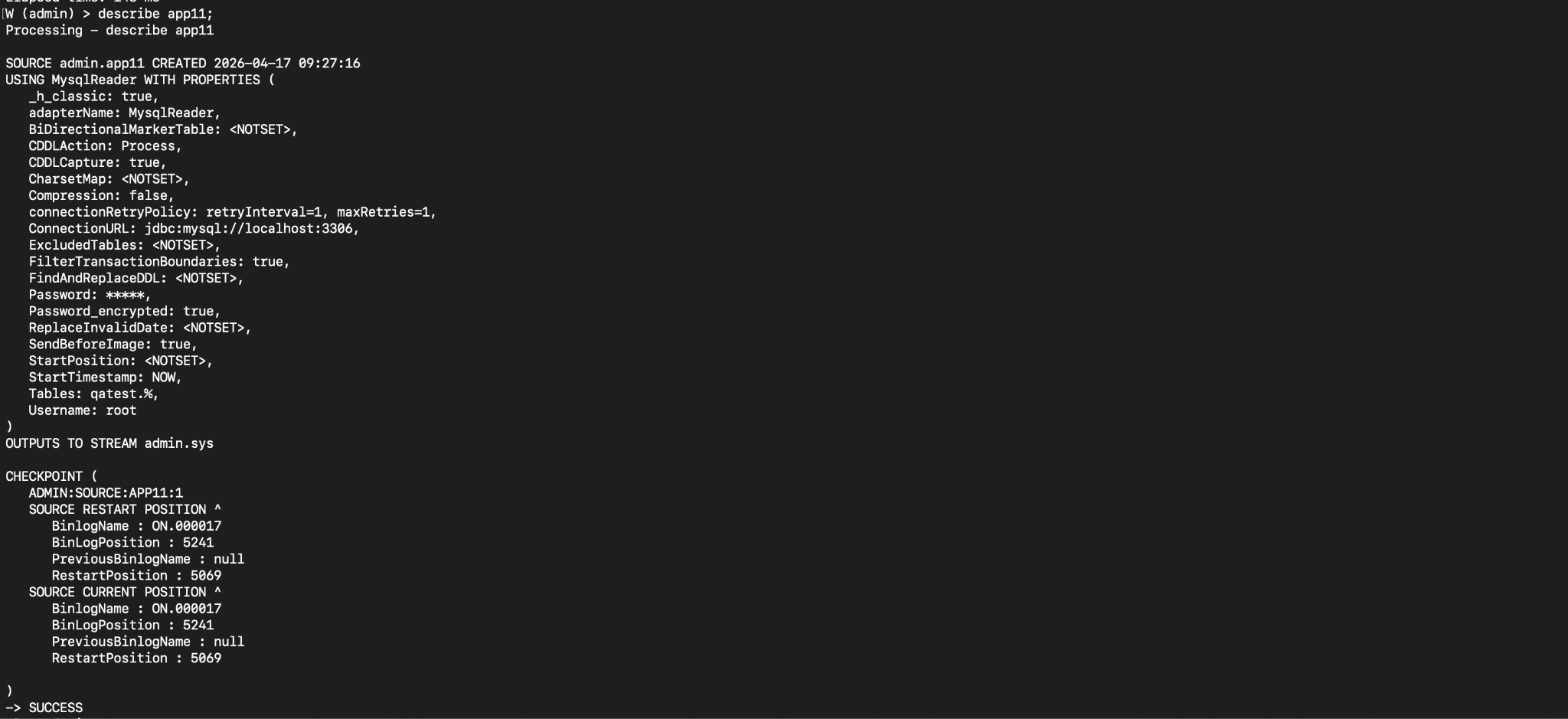
To see the recovery position when using GTID, enter describe <namespace>.<application name>; in the console. Output for a tagged GTID:

For an untagged GTID:

For a binlog Start Position:
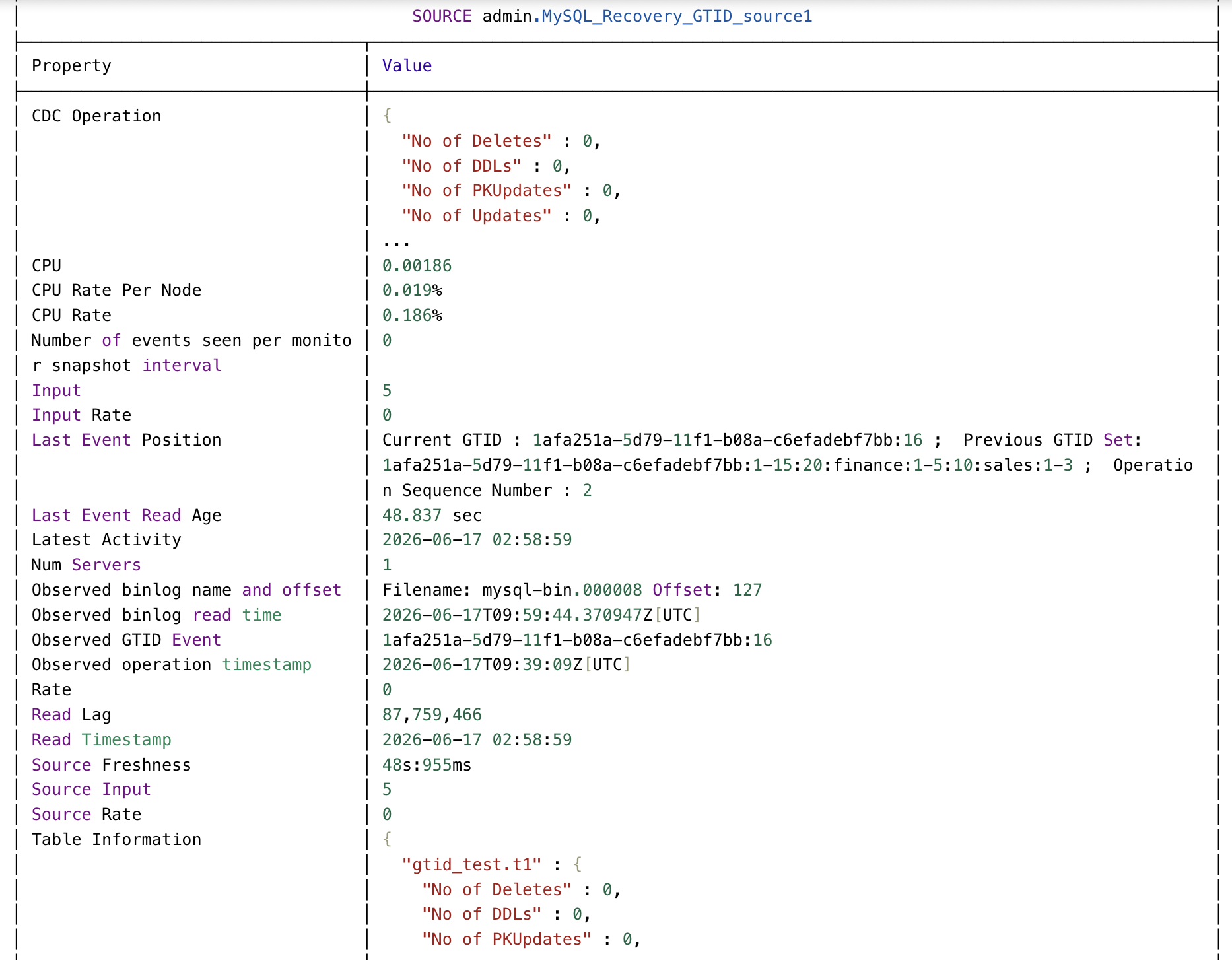
To see the current GTID for a running application, enter mon <MySQL Reader component name>; in the console.
MySQL Reader WAEvent fields
The output data type for MySQLReader is WAEvent. The fields are:
metadata:
BinlogFile: the binlog file from which MySQL Reader read the operation
BinlogPosition: the operation's position in the binlog file
OperationName: BEGIN, INSERT, UPDATE, DELETE, COMMIT, STOP
When schema evolution is enabled, OperationName for DDL events will be Alter, AlterColumns, Create, or Drop. This metadata is reserved for internal use by Striim and subject to change, so should not be used in CQs, open processors, or custom Java functions.
PK_UPDATE: for UPDATE only,
trueif the primary key value was changed, otherwisefalseTxnID: unique transaction ID generated by MySQLReader (the internal MySQL transaction ID is not written to the MySQL binary log until the COMMIT operation)
TimeStamp: timestamp from the MySQL binary log
TableName: fully qualified name of the table (for INSERT, UPDATE, and DELETE only).
To retrieve the values for these fields, use the META function. See Parsing the fields of WAEvent for CDC readers.
data: an array of fields, numbered from 0, containing:
for a BEGIN operation, 0 is the current database name and 1 is BEGIN
for an INSERT or DELETE, the values that were inserted or deleted
for an UPDATE, the values after the operation was completed
for a COMMIT, 0 is the ID number of the transaction
for a DDL CREATE or DDL DROP, 0 is the current database name and 1 is the CREATE or DROP statement
To retrieve the values for these fields, use SELECT ... (DATA[]). See Parsing the fields of WAEvent for CDC readers.
before (for UPDATE operations only): the same format as data, but containing the values as they were prior to the UPDATE operation
dataPresenceBitMap, beforePresenceBitMap, and typeUUID are reserved and should be ignored.
MySQLReader simple application
The following application will write change data for the specified table to SysOut. Replace wauser and ****** with the user name and password for the MySQL account you created for use by MySQLReader (see MySQL setup) and mydb and mytable with the names of the database and table(s) to be read.
CREATE APPLICATION MySQLTest;

CREATE SOURCE MySQLCDCIn USING MySQLReader (
  Username:'striim',
  Password:'******',
  ConnectionURL:'mysql://192.168.1.10:3306',
  Database:'mydb',
  Tables:'mytable'
)
OUTPUT TO MySQLCDCStream;

CREATE TARGET MySQLCDCOut
USING SysOut(name:MySQLCDC)
INPUT FROM MySQLCDCStream;

END APPLICATION MySQLTest;
MySQLReader example output
MySQLReader's output type is WAEvent. See WAEvent contents for change data for general information.
The following are examples of WAEvents emitted by MySQLReader for various operation types. They all use the following table:
CREATE TABLE POSAUTHORIZATIONS (BUSINESS_NAME varchar(30),
  MERCHANT_ID varchar(100),
  PRIMARY_ACCOUNT bigint,
  POS bigint,
  CODE varchar(20),
  EXP char(4),
  CURRENCY_CODE char(3),
  AUTH_AMOUNT decimal(10,3),
  TERMINAL_ID bigint,
  ZIP integer,
  CITY varchar(20));
INSERT
If you performed the following INSERT on the table:
INSERT INTO POSAUTHORIZATIONS VALUES(
  'COMPANY 1',
  'D6RJPwyuLXoLqQRQcOcouJ26KGxJSf6hgbu',
  6705362103919221351,
  0,
  '20130309113025',
  '0916',
  'USD',
  2.20,
  5150279519809946,
  41363,
  'Quicksand');
The WAEvent for that INSERT would be:
data: ["COMPANY 1","D6RJPwyuLXoLqQRQcOcouJ26KGxJSf6hgbu",6705362103919221351,0,"20130309113025",
    "0916","USD","2.200",5150279519809946,41363,"Quicksand"]
  metadata: {"BinlogFile":"ON.000004","TableName":"mydb.POSAUTHORIZATIONS",
    "TxnID":"1:000004:3559:1685955321000","OperationName":"INSERT",
    "GTIDPosition": "62827f24-02ba-11f1-9ffc-0242ac110002:109","TimeStamp":1685955321000,
    "OPERATION_TS":1685955321000,"BinlogPosition":3727}
  userdata: null
  before: null
  dataPresenceBitMap: "fw8="
  beforePresenceBitMap: "AAA="
  typeUUID: {"uuidstring":"01ee037e-a8e6-6c61-a752-c2cd07892059"}
UPDATE
If you performed the following UPDATE on the table:
UPDATE POSAUTHORIZATIONS SET BUSINESS_NAME = 'COMPANY 5A' where pos=0;
The WAEvent for that UPDATE for the row created by the INSERT above would be:
data: ["COMPANY 5A","D6RJPwyuLXoLqQRQcOcouJ26KGxJSf6hgbu",6705362103919221351,0,
    "20130309113025","0916","USD","2.200",5150279519809946,41363,"Quicksand"]
  metadata: {"PK_UPDATE":"false","BinlogFile":"ON.000004",
    "TableName":"mydb.POSAUTHORIZATIONS","TxnID":"1:000004:3990:1685955341000",
    "OperationName":"UPDATE","GTIDPosition": "62827f24-02ba-11f1-9ffc-0242ac110002:109",
    "TimeStamp":1685955341000,"OPERATION_TS":1685955341000,"BinlogPosition":4167}
  userdata: null
  before: ["COMPANY 1","D6RJPwyuLXoLqQRQcOcouJ26KGxJSf6hgbu",6705362103919221351,
    0,"20130309113025","0916","USD","2.200",5150279519809946,41363,"Quicksand"]
  dataPresenceBitMap: "fw8="
  beforePresenceBitMap: "fw8="
  typeUUID: {"uuidstring":"01ee037e-a8e6-6c61-a752-c2cd07892059"}
DELETE
If you performed the following DELETE on the table:
DELETE from POSAUTHORIZATIONS where pos=0;
The WAEvent for that DELETE for the row affected by the INSERT above would be:
data: ["COMPANY 5A","D6RJPwyuLXoLqQRQcOcouJ26KGxJSf6hgbu",6705362103919221351,0,
    "20130309113025","0916","USD","2.200",5150279519809946,41363,"Quicksand"]
  metadata: {"BinlogFile":"ON.000004","TableName":"mydb.POSAUTHORIZATIONS",
    "TxnID":"1:000004:4550:1685955350000","OperationName":"DELETE",
    "GTIDPosition": "62827f24-02ba-11f1-9ffc-0242ac110002:109","TimeStamp":1685955350000,
    "OPERATION_TS":1685955350000,"BinlogPosition":4718}
  userdata: null
  before: null
  dataPresenceBitMap: "fw8="
  beforePresenceBitMap: "AAA="
  typeUUID: {"uuidstring":"01ee037e-a8e6-6c61-a752-c2cd07892059"}
Note that the contents of data and before are reversed from what you might expect for a DELETE operation. This simplifies programming since you can get data for INSERT, UPDATE, and DELETE operations using only the data field.
MySQL Reader data type support and correspondence
MySQL type | TQL type | comments |
|---|---|---|
BIGINT | long | |
BIGINT UNSIGNED | long | |
BINARY | string | |
BIT | long | |
BLOB | string | |
CHAR | string | |
DATE | org.joda.time.LocalDate | If the MySQL and Striim hosts are not in the same time zone, the value will be converted to Striim's time zone. Dates prior to 1583 may be offset by several days due to the discontinuity in the switch from the Julian to Gregorian calendars (see What Calendar Is Used By MySQL?). |
DATETIME | org.joda.time.DateTime | Fractional seconds, if used, are dropped. If the MySQL and Striim hosts are not in the same time zone, the value will be converted to Striim's time zone. Dates prior to 1583 may be offset by several days due to the discontinuity in the switch from the Julian to Gregorian calendars (see What Calendar Is Used By MySQL?). |
DECIMAL | string | |
DECIMAL UNSIGNED | string | |
DOUBLE | double | |
ENUM | int | The value is the integer that is MySQL's internal representation (enumeration literals are assigned numbers in the order the literals were written in the declaration). |
FLOAT | float | If replicating from one MySQL database to another, see the notes for the Compression property in MySQL Reader properties. |
geometry types | unsupported | |
INT | int | |
INT UNSIGNED | int |
|
JSON | JSONNode | |
LONGBLOB | string | |
LONGTEXT | string | |
MEDIUMBLOB | string | |
MEDIUMINT | int | |
MEDIUMINT UNSIGNED | int |
|
MEDIUMTEXT | string | |
NUMERIC | string | |
NUMERIC UNSIGNED | string | |
SET | long | The value is the integer that is MySQL's internal representation (the integer represented by the bit string in which the nth bit is set, if the nth member of the SET's literals is present in the set). |
SMALLINT | short | |
SMALLINT UNSIGNED | short |
|
spatial types | unsupported | |
TEXT | string | |
TIME | org.joda.time.LocalTime | Fractional seconds, if used, are dropped. If the MySQL and Striim hosts are not in the same time zone, the value will be converted to Striim's time zone. |
TIMESTAMP | org.joda.time.DateTime | Fractional seconds, if used, are dropped. If the MySQL and Striim hosts are not in the same time zone, the value will be converted to Striim's time zone. Appending |
TINYBLOB | string | |
TINYINT | byte | |
TINYINT UNSIGNED | byte |
|
TINYTEXT | string | |
VARBINARY | string | |
VARCHAR | string | |
YEAR | int |
|
Target data type support & mapping for MariaDB and MySQL sources
The table below details how Striim maps the data types of a MariaDB or MySQL source to the data types of a target such as Azure Synapse, BigQuery, Databricks, and so on when you create an application using a wizard with Auto Schema Creation, perform an initial load using Database Reader with Create Schema enabled, or run the schema conversion utility, or when Striim schema evolution creates or alters target tables.
MySQL spatial types are not supported.
See Using Data Types from Other Database Engines for a list of supported data type aliases (such as boolean and numeric).
For fixed-length data types, Striim interprets the length parameter as one character = one byte, which can result in errors if the data uses multi-byte characters. To avoid this issue, manually increase the size of the data type in the target, or change the target data type to blob or clob.
If your screen is not wide enough to display the whole table, click in a cell and drag left to view the right-hand columns.
MariaDB / MySQL Data Type | Azure Synapse | BigQuery | ClickHouse | Databricks | Db2 for z/OS | Fabric Mirror | Iceberg Spark | MariaDB | Microsoft Fabric | MySQL | Oracle | PostgreSQL | Snowflake | Spanner | Spanner PG Dialect | SQL Server | Vertica | Yellowbrick |
|---|---|---|---|---|---|---|---|---|---|---|---|---|---|---|---|---|---|---|
BIGINT UNSIGNED | numeric(38) | numeric | UInt64 | decimal(38) | decimal(31) | long | decimal(38) | bigint unsigned | decimal(38) | bigint unsigned | int | double precision | integer | NUMERIC | float8 | numeric(38) | numeric(p) | decimal |
BINARY | binary(p) | bytes(p) | String | binary | binary(255) | bytes | binary | binary(p) | varbinary(p) | binary(p) | BLOB | bytea | BINARY | BYTES(p) | bytea | binary(p) | binary(p) | character varying(40000) |
BINARY(p) | binary(p), if (p) <= 8000 binary, if (p) > 8000* | bytes, if (p) > 9223372036854775807* bytes(p), if (p) <= 9223372036854775807 | String | binary | binary(255), if (p) <= 127 blob, if (p) > 127* | bytes | binary | binary(p), if (p) <= 255 | varbinary(max), if (p) > 8000* varbinary(p), if (p) <= 8000 | binary(p), if (p) <= 255 | BLOB | bytea, if (p) <= 2147483647 | BINARY, if (p) <= 8388608 BINARY, if (p) > 8388608* | BYTES(MAX), if (p) > 10485760* BYTES(p), if (p) <= 10485760 | bytea, if (p) <= 1048576 | binary(p), if (p) <= 8000 binary, if (p) > 8000* | binary(p), if (p) <= 65000 long varbinary(p), if 65000 <= (p) <= 32000000* | character varying(40000) |
BIT | BIT | bytes(p) | FixedString(1) | binary | binary(255) | bytes | binary | bit(p) | BIT | bit(p) | BLOB | bit | BINARY | STRING(p) | bytea | BIT | binary(p) | character varying(p) |
BIT(p) | varchar(p), if 1 <= (p) <= 8000 | bytes(p), if (p) <= 9223372036854775807 | String | binary | binary(255), if (p) <= 127 | bytes | binary | bit(p), if (p) <= 64 | varchar(p), if 1 <= (p) <= 8000 | bit(p), if (p) <= 64 | BLOB | bit varying(p), if 1 <= (p) <= 2147483647 | BINARY, if (p) <= 8388608 | STRING(p), if (p) <= 2621440 | bytea, if (p) <= 1048576 | varchar(p), if 1 <= (p) <= 8000 | binary(p), if (p) <= 65000 | character varying(p), if (p) <= 64000 |
BLOB | varbinary(8000) | bytes(p) | String | binary | blob(p) | bytes | binary | longblob | varbinary(max) | longblob | BLOB | bytea | BINARY | BYTES(p) | bytea | varbinary(max) | long varbinary(p) | Not supported |
CHAR | character(p) | string | String | string | character(p) | string | char(p) | character(p) | varchar(p) | character(p) | character(p) | character(p) | character(p) | STRING(p) | varchar(p) | character(p) | character(p) | character(p) |
CHAR(p) | character(p), if (p) <= 8000 varchar(8000), if (p) > 8000* | string | String | string | clob(p), if 255 <= (p) <= 2147483647* character(p), if (p) <= 255 | string | string, if (p) > 2147483647 char(p), if (p) <= 2147483647 | longtext, if 255 <= (p) <= 2147483647* character(p), if (p) <= 255 | varchar(max), if (p) > 8000* varchar(p), if (p) <= 8000 | longtext, if 255 <= (p) <= 2147483647* character(p), if (p) <= 255 | clob, if (p) > 2000* character(p), if (p) <= 2000 | character(p), if (p) <= 10485760 text, if (p) > 10485760* | character, if (p) > 16777216* character(p), if (p) <= 16777216 | STRING(p), if (p) <= 2621440 | varchar(p), if (p) <= 1048576 text, if (p) > 1048576* | character(p), if (p) <= 8000 varchar(max), if (p) > 8000* | character(p), if (p) <= 65000 long varchar(p), if 65000 <= (p) <= 32000000* | character(p), if (p) <= 64000 |
DATE | date | date | Date32 | date | date | date | date | date | date | date | date | date | date | DATE | date | date | date | date |
DATETIME | datetime2 | datetime | DateTime64(s) | timestamp | timestamp | timestamp-millis | timestamp_ntz | datetime | datetime2(6) | datetime | timestamp | timestamp(s) without time zone | datetime | TIMESTAMP | timestamptz | datetime2 | timestamp(s) | timestamp |
DATETIME(s) | datetime2 | datetime, if (s) <= 6 | DateTime64(s), if (s) <= 9 | timestamp | timestamp | timestamp-millis | timestamp_ntz | datetime | datetime2(6) | datetime | timestamp | timestamp(s) without time zone, if (p) <= 29, if (s) <= 6 | datetime | TIMESTAMP | timestamptz, if (p) <= 36, if (s) <= 6 | datetime2 | timestamp(s), if (p) <= 29, if (s) <= 6 | timestamp |
DECIMAL | numeric(p,s) | numeric | Decimal(p, s) | decimal(p,s) | numeric(p,s) | decimal | decimal(p,s) | decimal(p,s) | decimal(p,s) | decimal(p,s) | number(p,s) | numeric(p,s) | numeric(p,s) | NUMERIC | numeric | numeric(p,s) | numeric(p,s) | decimal(p,s) |
DECIMAL UNSIGNED | numeric(p,s) | numeric | Decimal(p, s) | decimal(p,s) | numeric(p,s) | decimal | decimal(p,s) | decimal(p,s) unsigned | decimal(p,s) | decimal(p,s) unsigned | numeric(p,s) | numeric(p,s) | numeric(p,s) | NUMERIC | numeric | numeric(p,s) | numeric(p,s) | decimal(p,s) |
DECIMAL UNSIGNED(p,0) | numeric(p,s), if (p) <= 38, if (s) <= 38 | numeric, if (p) <= 29, if (s) <= 9 | Decimal(p, s), if (p) <= 76, if (s) <= 76 | decimal(p,s), if (p) <= 38, if (s) <= 37 | numeric(p,s), if (p) <= 31, if (s) <= 30 | decimal, if (p) <= 38 | decimal(p,s), if (p) <= 38, if (s) <= 38 | decimal(p,s) unsigned, if (p) <= 65, if (s) <= 30 | decimal(p,s), if (p) <= 38, if (s) <= 38 | decimal(p,s) unsigned, if (p) <= 65, if (s) <= 30 | numeric(p,s), if (p) <= 38, if (s) <= 127 | numeric(p,s), if (p) <= 1000, if (s) <= 1000 | numeric(p,s), if (p) <= 38, if (s) <= 37 | NUMERIC, if (p) <= 38, if (s) <= 9 | numeric, if (p) <= 131072, if (s) <= 16384 | numeric(p,s), if (p) <= 38, if (s) <= 38 | numeric(p,s), if (p) <= 1024, if (s) <= 1024 | decimal(p,s), if (p) <= 38, if (s) <= 38 |
DECIMAL UNSIGNED(p,s) | varchar(8000), if (p,s) > 38, if (s) > 38* numeric(p,s), if (p) <= 38, if (s) <= 38 | string, if (p,s) > 39, if (s) > 38* numeric, if (p) <= 29, if (s) <= 9 bignumeric, if 29 <= (p) <= 39, if 9 <= (s) <= 38 | Decimal(p, s), if (p) <= 76, if (s) <= 76 String, if (s) > 76* String, if (p,s) > 76* | string, if (p,s) > 38, if (s) > 37* decimal(p,s), if (p) <= 38, if (s) <= 37 | numeric(p,s), if (p) <= 31, if (s) <= 30 varchar(1000), if (p,s) > 31, if (s) > 30* | string, if (p,s) > 38* decimal, if (p) <= 38 | string, if (p,s) > 38, if (s) > 38* decimal(p,s), if (p) <= 38, if (s) <= 38 | TEXT, if (p,s) > 65* decimal(p,s) unsigned, if (p) <= 65, if (s) <= 30 TEXT, if (s) > 30* | varchar(max), if (p,s) > 38, if (s) > 38* decimal(p,s), if (p) <= 38, if (s) <= 38 | TEXT, if (p,s) > 65* decimal(p,s) unsigned, if (p) <= 65, if (s) <= 30 TEXT, if (s) > 30* | numeric(p,s), if (p) <= 38, if (s) <= 127 number, if (p,s) > 38, if (s) > 127* | numeric, if (p,s) > 1000* numeric(p,s), if (p) <= 1000, if (s) <= 1000 numeric, if (s) > 1000* | numeric(p,s), if (p) <= 38, if (s) <= 37 | STRING(MAX), if (p,s) > 308, if (s) > 15* NUMERIC, if (p) <= 38, if (s) <= 9 FLOAT64, if 38 <= (p) <= 308, if 9 <= (s) <= 15 | numeric, if (p) <= 131072, if (s) <= 16384 | varchar(8000), if (p,s) > 38, if (s) > 38* numeric(p,s), if (p) <= 38, if (s) <= 38 | numeric(p,s), if (p) <= 1024, if (s) <= 1024 | character varying, if (p,s) > 38, if (s) > 38* decimal(p,s), if (p) <= 38, if (s) <= 38 |
DECIMAL(p,0) | numeric(p,s), if (p) <= 38, if (s) <= 38 | numeric, if (p) <= 29, if (s) <= 9 | Decimal(p, s), if (p) <= 76, if (s) <= 76 | decimal(p,s), if (p) <= 38, if (s) <= 37 | numeric(p,s), if (p) <= 31, if (s) <= 30 | decimal, if (p) <= 38 | decimal(p,s), if (p) <= 38, if (s) <= 38 | decimal(p,s), if (p) <= 65, if (s) <= 30 | decimal(p,s), if (p) <= 38, if (s) <= 38 | decimal(p,s), if (p) <= 65, if (s) <= 30 | number(p,s), if (p) <= 38, if (s) <= 127 | numeric(p,s), if (p) <= 1000, if (s) <= 1000 | numeric(p,s), if (p) <= 38, if (s) <= 37 | NUMERIC, if (p) <= 38, if (s) <= 9 | numeric, if (p) <= 131072, if (s) <= 16384 | numeric(p,s), if (p) <= 38, if (s) <= 38 | numeric(p,s), if (p) <= 1024, if (s) <= 1024 | decimal(p,s), if (p) <= 38, if (s) <= 38 |
DECIMAL(p,s) | varchar(8000), if (p,s) > 38, if (s) > 38* numeric(p,s), if (p) <= 38, if (s) <= 38 | string, if (p,s) > 39, if (s) > 38* numeric, if (p) <= 29, if (s) <= 9 bignumeric, if 29 <= (p) <= 39, if 9 <= (s) <= 38 | Decimal(p, s), if (p) <= 76, if (s) <= 76 String, if (s) > 76* String, if (p,s) > 76* | string, if (p,s) > 38, if (s) > 37* decimal(p,s), if (p) <= 38, if (s) <= 37 | numeric(p,s), if (p) <= 31, if (s) <= 30 varchar(1000), if (p,s) > 31, if (s) > 30* | string, if (p,s) > 38* decimal, if (p) <= 38 | string, if (p,s) > 38, if (s) > 38* decimal(p,s), if (p) <= 38, if (s) <= 38 | decimal(p,s), if (p) <= 65, if (s) <= 30 TEXT, if (p,s) > 65* TEXT, if (s) > 30* | varchar(max), if (p,s) > 38, if (s) > 38* decimal(p,s), if (p) <= 38, if (s) <= 38 | decimal(p,s), if (p) <= 65, if (s) <= 30 TEXT, if (p,s) > 65* TEXT, if (s) > 30* | number, if (p,s) > 38, if (s) > 127* number(p,s), if (p) <= 38, if (s) <= 127 | numeric, if (p,s) > 1000* numeric(p,s), if (p) <= 1000, if (s) <= 1000 numeric, if (s) > 1000* | numeric(p,s), if (p) <= 38, if (s) <= 37 VARCHAR, if (p,s) > 38, if (s) > 37* | STRING(MAX), if (p,s) > 308, if (s) > 15* NUMERIC, if (p) <= 38, if (s) <= 9 FLOAT64, if 38 <= (p) <= 308, if 9 <= (s) <= 15 | numeric, if (p) <= 131072, if (s) <= 16384 | varchar(8000), if (p,s) > 38, if (s) > 38* numeric(p,s), if (p) <= 38, if (s) <= 38 | numeric(p,s), if (p) <= 1024, if (s) <= 1024 | character varying, if (p,s) > 38, if (s) > 38* decimal(p,s), if (p) <= 38, if (s) <= 38 |
DOUBLE | float | float64 | Float64 | double | double | double | double | double(p,s) | float | double(p,s) | double precision | real | float | FLOAT64 | float8 | float(p) | float(p) | double precision |
DOUBLE(p,0) | float | float64 | Float64, if (p) <= 53 | double | double, if (p) <= 31, if (s) <= 30 | double | double | double(p,s), if (p) <= 255, if (s) <= 30 | float | double(p,s), if (p) <= 255, if (s) <= 30 | double precision, if (p) <= 126 | real, if (p) <= 37, if (s) <= 7 | float, if (p) <= 307, if (s) <= 34 | FLOAT64, if (p) <= 308, if (s) <= 15 | float8 | float(p), if (p) <= 53, if (s) <= 16 | float(p), if (p) <= 53 | double precision |
DOUBLE(p,s) | float | float64 | Float64, if (p) <= 53 String, if (p,s) > 53* | double | varchar(500), if (p,s) > 31* varchar(500), if (s) > 30* varchar(500), if (p,s) > 31, if (s) > 30* double, if (p) <= 31, if (s) <= 30 | double | double | double, if (s) > 30* double, if (p,s) > 255* double(p,s), if (p) <= 255, if (s) <= 30 | float | double, if (s) > 30* double, if (p,s) > 255* double(p,s), if (p) <= 255, if (s) <= 30 | nclob, if (p,s) > 4000* double precision, if (p) <= 126 VARCHAR2(4000), if 126 <= (p) <= 4000* | double precision, if 37 <= (p) <= 307, if 7 <= (s) <= 15 real, if (p) <= 37, if (s) <= 7 double precision, if 307 <= (p) <= 307* double precision, if 37 <= (p) <= 307, if (s) > 7* | float, if 307 <= (p) <= 307* float, if (p) <= 307, if (s) <= 34 float, if (s) > 34* | STRING(MAX), if (p,s) > 308, if (s) > 15* FLOAT64, if (p) <= 308, if (s) <= 15 | float8 | float(p), if 53 <= (p) <= 53* varchar(8000), if (p,s) > 53* float(p), if (p) <= 53, if (s) <= 16 | numeric(p,s), if 53 <= (p) <= 1024* numeric(p,s), if 53 <= (p) <= 1024, if (s) <= 1024 float(p), if (p) <= 53 | double precision |
ENUM | varchar(8000) | string | String | string | varchar(250) | string | string | text | varchar(max) | text | VARCHAR2(200) | character varying | VARCHAR | STRING(MAX) | text | varchar(8000) | varchar | character varying |
FLOAT | float | float64 | Float32 | float | double | double | double | float | float | float | float | real | float | FLOAT64 | float8 | float(p) | float(p) | real |
FLOAT(p,s) | float | float64 | String, if (p,s) > 53* Float32, if (p) <= 24 Float64, if 24 <= (p) <= 53 | float, if (p) <= 38 double, if (p,s) > 38 | varchar(500), if (p,s) > 76* varchar(500), if (s) > 30* double, if (p) <= 76, if (s) <= 30 | double | double, if (p,s) > 10 | float, if (p) <= 38, if (s) <= 30 double, if (p,s) > 38, if (s) > 30* | float | float, if (p) <= 38, if (s) <= 30 double, if (p,s) > 38, if (s) > 30* | float, if (p) <= 126 VARCHAR2(4000), if 126 <= (p) <= 4000* | double precision, if 37 <= (p) <= 307, if 7 <= (s) <= 15 real, if (p) <= 37, if (s) <= 7 double precision, if 307 <= (p) <= 307* double precision, if 37 <= (p) <= 307, if (s) > 7* | float, if 307 <= (p) <= 307* float, if (p) <= 307, if (s) <= 34 float, if (s) > 34* | STRING(MAX), if (p,s) > 308, if (s) > 15* FLOAT64, if (p) <= 308, if (s) <= 15 | float8 | float(p), if 53 <= (p) <= 53* float(p), if (p) <= 53, if (s) <= 16 | numeric(p,s), if 53 <= (p) <= 1024* float(p), if (p) <= 53 | real, if (p) <= 24 double precision, if (p,s) > 24* |
GEOMETRY | Not supported | Not supported | Not supported | Not supported | Not supported | Not supported | Not supported | Not supported | Not supported | Not supported | Not supported | Not supported | Not supported | Not supported | Not supported | Not supported | Not supported | Not supported |
INT | integer | int64 | Int32 | integer | integer | int | integer | integer | int | integer | int | integer | integer | INT64 | int | integer | integer | integer |
INT UNSIGNED | integer | int64 | UInt32 | integer | integer | int | integer | integer unsigned | int | integer unsigned | int | bigint | integer | INT64 | int | integer | integer | integer |
JSON | varchar(8000) | string | String | string | clob | string | string | json | varchar(max) | json | clob | json | VARIANT | STRING(MAX) | jsonb | varchar(max) | long varchar(10000000) | character varying |
LONGBLOB | varbinary(8000) | bytes(p) | String | binary | blob(p) | bytes | binary | longblob | varbinary(max) | longblob | BLOB | bytea | BINARY | BYTES(MAX) | Not supported | varbinary(max) | Not supported | Not supported |
LONGTEXT | varchar(8000) | string | String | string | clob(p) | string | string | LONGTEXT | varchar(max) | LONGTEXT | clob | text | VARCHAR | STRING(MAX) | Not supported | varchar(max) | Not supported | character varying |
MEDIUMBLOB | varbinary(8000) | bytes(p) | String | binary | blob(p) | bytes | binary | longblob | varbinary(max) | longblob | BLOB | bytea | BINARY | BYTES(MAX) | Not supported | varbinary(max) | long varbinary(p) | Not supported |
MEDIUMINT | integer | int64 | Int32 | integer | integer | int | integer | mediumint | int | mediumint | int | integer | integer | INT64 | int | integer | integer | integer |
MEDIUMINT UNSIGNED | integer | int64 | UInt32 | integer | integer | int | integer | mediumint unsigned | int | mediumint unsigned | int | integer | integer | INT64 | int | integer | integer | integer |
MEDIUMTEXT | varchar(8000) | string | String | string | clob(p) | string | string | MEDIUMTEXT | varchar(max) | MEDIUMTEXT | clob | text | VARCHAR | STRING(MAX) | Not supported | varchar(max) | long varchar(p) | character varying |
SET | Not supported | Not supported | Not supported | Not supported | Not supported | Not supported | Not supported | Not supported | Not supported | Not supported | Not supported | Not supported | Not supported | Not supported | Not supported | Not supported | Not supported | Not supported |
SMALLINT | smallint | int64 | Int16 | smallint | smallint | int | short | smallint | smallint | smallint | int | smallint | integer | INT64 | int | smallint | integer | smallint |
SMALLINT UNSIGNED | smallint | int64 | UInt16 | smallint | smallint | int | short | smallint unsigned | smallint | smallint unsigned | int | smallint | integer | INT64 | int | smallint | integer | smallint |
TEXT | varchar(8000) | string | String | string | clob(p) | string | string | TEXT | varchar(max) | TEXT | clob | text | VARCHAR | STRING(p) | text | varchar(max) | long varchar(p) | character varying |
TIME | time | time | Time64(6) | string | time | time-millis | string | time | time(6) | time | VARCHAR2(150) | time | time | STRING(150) | varchar(150) | time | time | time |
TIMESTAMP | datetime2 | timestamp | DateTime64(s) | timestamp | timestamp | timestamp-millis | timestamp_ntz | datetime(s) | datetime2(6) | datetime(s) | timestamp(s) | timestamp(s) without time zone | timestamp | TIMESTAMP | timestamptz | datetime2 | timestamp(s) | timestamp |
TINYBLOB | varbinary(p) | bytes(p) | String | binary | blob(p) | bytes | binary | longblob | varbinary(p) | longblob | BLOB | bytea | BINARY | BYTES(p) | bytea | varbinary(p) | long varbinary(p) | character varying(p) |
TINYINT | smallint | int64 | Int8 | smallint | smallint | int | byte | tinyint | smallint | tinyint | int | smallint | integer | INT64 | int | smallint | integer | smallint |
TINYINT UNSIGNED | tinyint | int64 | UInt8 | smallint | smallint | int | byte | tinyint unsigned | smallint | tinyint unsigned | int | smallint | integer | INT64 | int | tinyint | integer | smallint |
TINYTEXT | varchar(p) | string | String | string | clob(p) | string | string | TINYTEXT | varchar(p) | TINYTEXT | clob | text | VARCHAR | STRING(p) | text | varchar(p) | long varchar(p) | character varying(p) |
VARBINARY(p) | varbinary(8000), if (p) > 8000* varbinary(p), if (p) <= 8000 | bytes, if (p) > 9223372036854775807* bytes(p), if (p) <= 9223372036854775807 | String | binary | blob, if (p) > 1011* varbinary(4046), if (p) <= 1011 | bytes | binary | varbinary(65535), if (p) > 65535 varbinary(p), if (p) <= 65535 | varbinary(max), if (p) > 8000* varbinary(p), if (p) <= 8000 | varbinary(65535), if (p) > 65535 varbinary(p), if (p) <= 65535 | BLOB | bytea, if (p) <= 2147483647 bytea, if (p) > 2147483647* | VARBINARY | BYTES(MAX), if (p) > 10485760* BYTES(p), if (p) <= 10485760 | bytea, if (p) <= 1048576 bytea, if (p) > 1048576* | varbinary(max), if (p) > 8000* varbinary(p), if (p) <= 8000 | long varbinary(p), if 65000 <= (p) <= 32000000 varbinary(p), if (p) <= 65000 | character varying, if (p) > 64000* character varying(p), if (p) <= 64000 |
VARCHAR(p) | varchar(p), if (p) <= 8000 varchar(8000), if (p) > 8000* | string | String | string | varchar(p), if (p) <= 4045 clob(p), if 4045 <= (p) <= 2147483647 | string | string, if (p) > 2147483647 varchar(p), if (p) <= 2147483647 | longtext, if 65535 <= (p) <= 2147483647* varchar(p), if (p) <= 65535 | varchar(max), if (p) > 8000* varchar(p), if (p) <= 8000 | longtext, if 65535 <= (p) <= 2147483647* varchar(p), if (p) <= 65535 | clob, if (p) > 4000* VARCHAR2(p), if (p) <= 4000 | character varying(p), if (p) <= 10485760 character varying, if (p) > 10485760* | VARCHAR, if (p) > 16777216* VARCHAR(p), if (p) <= 16777216 | STRING(MAX), if (p) > 2621440 STRING(p), if (p) <= 2621440 | varchar(p), if (p) <= 1048576 text, if (p) > 1048576* | varchar(max), if (p) > 8000* varchar(p), if (p) <= 8000 | varchar(p), if (p) <= 65000 long varchar(p), if 65000 <= (p) <= 32000000* | character varying, if (p) > 64000* character varying(p), if (p) <= 64000 |
YEAR | integer | int64 | UInt16 | bigint | integer | int | integer | year | int | year | int | integer | numeric(38,0) | INT64 | int8 | integer | integer | integer |
*When using the schema conversion utility, these mappings appear in converted_tables_with_striim_intelligence.sql.